
Configuration
Select ZCode CLI
Open the model picker in a new BB thread and select ZCode CLI. The provider ID is acp-zcode-cli.
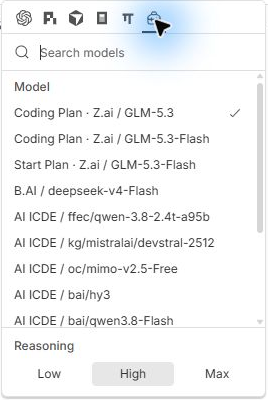
Choose the source before the model
| Source | Authorization and routing |
|---|---|
| Coding Plan · Z.ai / BigModel | Reuses the active Desktop account family and obtains temporary project tokens. |
| Start Plan · Z.ai / BigModel | Uses the Desktop sign-in and a verified, positive, unexpired model balance. It does not fall back to Coding Plan when unavailable. |
| Personal API connection, such as B.AI | Uses the connection already configured in ZCode. Each source retains its own identity. |
BB 0.49 displays a flat model list, so source names are included in row labels. Coding Plan and Start Plan appear first. Model availability comes from the native catalog and account service; an example screenshot is not a promise that the same models are available for every account.
Reasoning choices, such as Low, High and Max, come from the selected model. Changing reasoning keeps its model ID stable.
Permissions and modes
| Choice | Native mode |
|---|---|
| Standalone default | build: ask before changes. |
| BB Accept edits | edit. It cannot be escalated to yolo by an environment override. |
| BB Full | yolo. |
| Explicit planning | plan, when selected through the adapter's configuration. |
ACP tool permissions offer allow once and deny. Permanent grants are not forwarded.
Plugin page
The zcode-acp · Rust section shows the current/latest versions for the selected computer. Install, Check for updates and Update download a stable GitHub Release binary after SHA-256 verification. See installation.
ACP executable (acpCommand): leave empty to use the plugin-managed installation on that computer, then zcode-acp from PATH, or enter a full path to the Rust binary (for example D:\Tools\zcode-acp.exe). It is used for chat, model discovery and quota commands. An explicit missing executable fails without falling back. Do not include arguments or shell quotes. After downloading, Use installed ACP can clear a custom override; this setting applies to all computers.
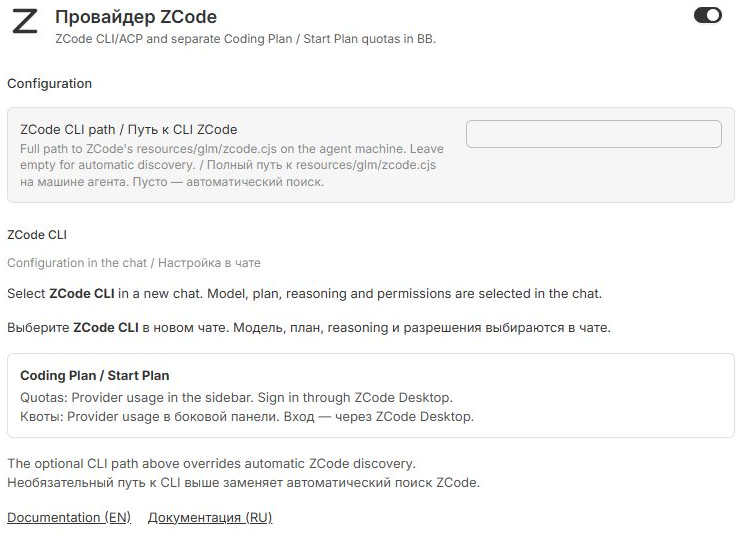
ZCode CLI path (nativeEntry): Enter the full path to resources/glm/zcode.cjs on the machine running the agent, for example D:\Apps\ZCode\resources\glm\zcode.cjs. Use the file path, without shell quotes. Leave it empty for automatic discovery.
The plugin forwards it to ZCode CLI as ZCODE_NATIVE_ENTRY, including model discovery. Quota inventory and collection use the same path. It is read for each new command; re-registration is unnecessary. Restart an already running ACP session and refresh the model/usage panel after changing installations.
Model, plan, reasoning and permissions remain chat options. Coding Plan and Start Plan quotas are in Provider usage.
Sign-in
Sign in through ZCode Desktop. The adapter reads its saved sign-in and refreshes short-lived project tokens in memory. Normal restarts do not require signing in through a browser again. If the saved account expires or is rejected, reconnect it in Desktop.
Do not run zcode login as an installation step. Do not copy account tokens into the plugin settings or commit account files.
Optional environment overrides
Advanced overrides belong to the environment of the agent host. The plugin exposes the ACP executable and ZCode installation path. The CLI lists its supported flags:
zcode-acp --help| Variable | Purpose |
|---|---|
ZCODE_NODE | Explicit runtime override. Default: the selected ZCode bundle's runtime, then Node.js 24+ from the agent host PATH. --node takes precedence. |
ZCODE_NATIVE_ENTRY | Absolute path to the installed resources/glm/zcode.cjs when automatic discovery fails. |
ZCODE_STORAGE_DIR | Explicit Desktop storage directory; otherwise .zcode under the configured data base/home is used. |
ZCODE_DATA_BASE_DIR | Base directory for the default .zcode storage location. |
ZCODE_ACP_STATE_DIR | Adapter session root; default ~/.zcode-bridge/native-acp. |
ZCODE_NATIVE_MODE | build, plan, edit or yolo, within BB's permission limit. |
ZCODE_NATIVE_MEMORY | 1 enables native memory for future sessions. Off by default to avoid background model requests. |
Restart existing ACP sessions after changing their environment. Windows session folders use a current-user ACL; POSIX folders use mode 0700. ACP sessions use bb-native-* IDs and never resume Desktop-owned tasks.